Use the steps below to remove a section or event from the system.
Find the course
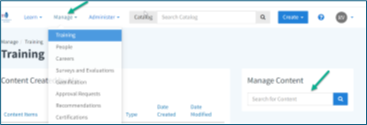
- From the home screen, hover over Quản lý and select Đào tạo.
- Use the Quản lý nội dung search bar to find the course.
- Select the course from the results.
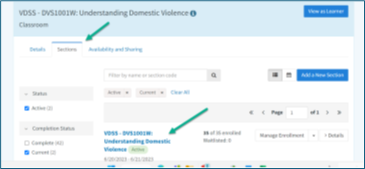
- Go to the Phần tab.
Delete a section
- In the Phần tab, find the section you want to remove.
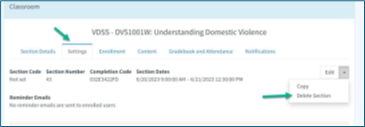
- Click the dropdown arrow next to Chỉnh sửa.
- Lựa chọn Delete Section.
Delete an event (or portion of an event)
- Select the section to open it.
- Đi đến Section Details.
- Scroll to the list of events.
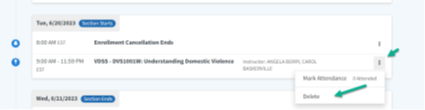
- Click the three dots (ellipsis) next to the event.
- Lựa chọn Xóa.
Tip
Before deleting, check that the section or event is no longer needed. This helps prevent loss of important training records.
 / Virginia Learning Center / Mẹo sử dụng VLC / Quản lý khóa học / Cách xóa các phần và sự kiện





 Tìm bộ phận địa phương của tôi