Follow these steps to get the Classroom Course Enrollment Summary from the VDSS External Domain.
Step 1: Go to the Reports Console
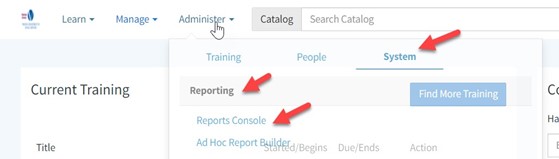
From the Home screen, hover over Administer.
Click System, then Reporting, and then Reports Console.
Step 2: Search for the Report
In the search box, type Progress.
From the results, select Classroom Course Enrollment Summary.
Step 3: Choose Your Organization
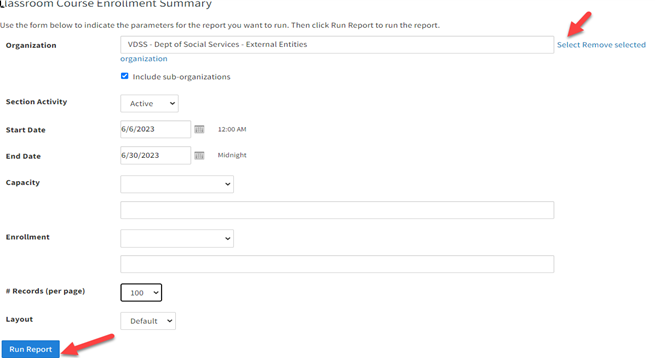
Click Select next to the Organization field.
In the pop-up box, search for and select Social Services External.
If you want to include sub-organizations, check the box for that option.
Step 4: Set Parameters and Run
Enter your report parameters.
Click Run Report.
Trang web này sử dụng cookie để nâng cao trải nghiệm duyệt web của bạn. Bằng cách tiếp tục sử dụng trang web của chúng tôi, bạn đồng ý với việc chúng tôi sử dụng cookie. Vui lòng xem lại chính sách web của chúng tôi để biết thông tin liên quan đến dữ liệu chúng tôi thu thập và cách chúng tôi đảm bảo nó vẫn an toàn.
 / Virginia Learning Center / Mẹo sử dụng VLC / Vai trò báo cáo / Cách điền vào Báo cáo tuyển sinh





 Tìm bộ phận địa phương của tôi